
Start with the job
A defined site and work package give every item and piece of evidence a place to belong.
Oculi keeps each item, photo, note, status, location, sign-off, and follow-up tied to the work it documents, from assigned work through office review and reporting.
Photos, notes, markups, messages, and reports often drift apart. By the time the office starts reviewing the work, someone has to identify the photos, fill evidence gaps, reconcile statuses, and rebuild the site visit.
Oculi keeps the evidence attached to the work. The record begins with the job instead of with a folder created after the crew comes back.
Each step adds context to the same piece of work instead of creating another loose handoff.
A defined site and work package give every item and piece of evidence a place to belong.
Record item details, photos, notes, status, checklist context, location, equipment details, and sign-offs while the work is happening.
Cached work, local progress, queued photos, and sync recovery help crews continue when connectivity is unreliable.
Office teams can see open items, evidence gaps, and incomplete details before delivery.
Use the same reviewed photos, notes, statuses, and sign-offs captured on site.
Unresolved work remains visible as Site Follow-Up Items after the report is completed.
The open-items list and the item record show how photos, status, work area, and follow-up stay connected in one field record.
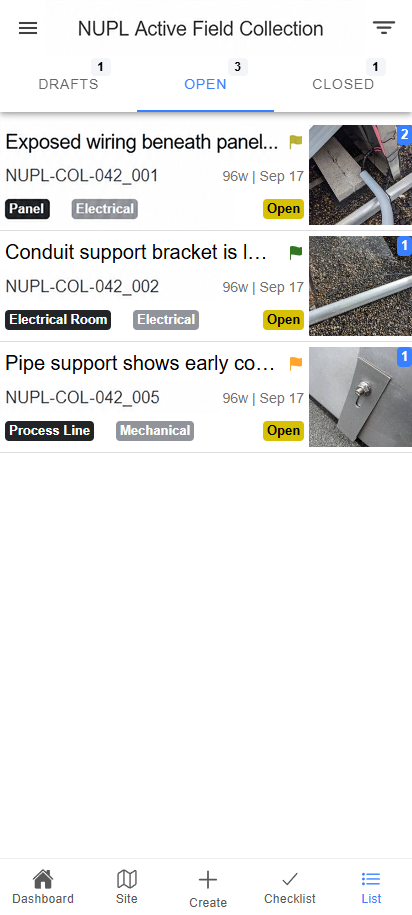
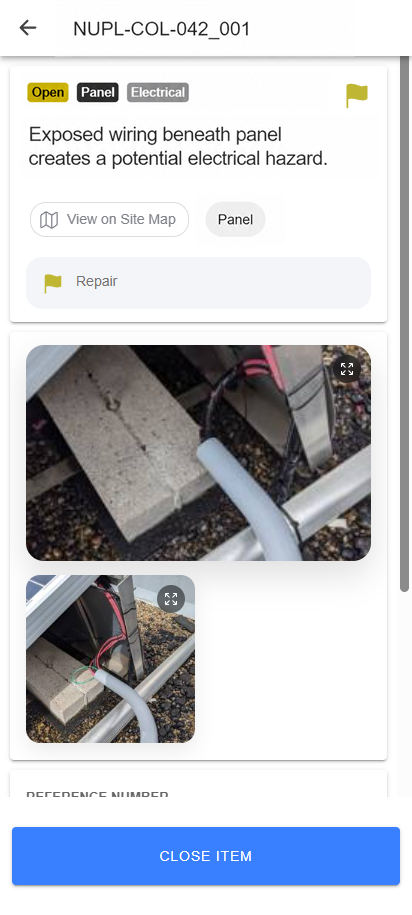
Item details, work area, status, and photos remain together in the field record.
Evidence remains tied to the item, action, area, and status it supports.
Open status and follow-up context stay attached to the item for office review.
When a site map is available, Oculi can make location part of the record instead of a separate note. Reviewers can see what happened, where it happened, and what still needs attention.
Unresolved work stays visible as Site Follow-Up Items, and the reviewed site history gives the next visit the right context.
These answers explain what the visual site record contains, how it differs from a photo folder, and what it does not include.
A visual site record keeps every item, photo, note, status, location, sign-off, and follow-up tied to the work it documents. In Oculi, the record starts with the assigned work package, is built during mobile capture, is reviewed by the office, and feeds the client report and any follow-up that remains open.
A photo folder stores images. A visual site record keeps each photo attached to the item, site, work package, and status it supports, so nobody has to explain weeks later which wall, asset, room, or job a photo belonged to.
When a site map is available, Oculi can make location part of the record. Items and follow-up work can be reviewed in site context, so teams can see what happened, where it happened, and what still needs attention.
Open items remain visible as Site Follow-Up Items instead of disappearing inside a completed PDF, so the next visit starts with the right context and site history.
No. The Oculi visual site record is built from photos, notes, statuses, locations, checklist context, and sign-offs. 360-degree panorama viewing, 3D scans, and point-cloud measurement are not part of Oculi.
Yes. Oculi supports cached work, local item progress, queued photos, and sync recovery so crews can keep capturing the record and synchronize when the connection is stable.
Bring an anonymized report or closeout package and the field form behind it. We will map where capture, review, reporting, and follow-up can stay connected.