
Capture the evidence
Record each item, photo, note, status, checklist response, location, and sign-off against the work it supports.
For field-service teams delivering inspections and closeout packages, Oculi keeps deficiencies, photos, notes, sign-offs, locations, status, and open work together from field capture through review and client delivery.
When evidence loses its item, location, and status context, the office has to identify photos, reconcile deficiencies, chase sign-offs, and rebuild the package after the field work is finished.
Oculi captures the reporting context while the crew is still close enough to the work to correct a gap.
Use the same reviewed photos, notes, statuses, checklist details, and sign-offs captured during the inspection instead of rebuilding the visit from loose files.
Record each item, photo, note, status, checklist response, location, and sign-off against the work it supports.
Review open items, missing evidence, incomplete details, and inconsistent statuses before client delivery.
Use the reviewed record for the report or closeout package instead of copying information into a new file set.
Open deficiencies and unresolved items can remain visible as Site Follow-Up Items after closeout.
The next visit can start with the prior evidence, status, and follow-up instead of another blank record.
Cached work, local item progress, queued photos, and sync recovery support field work when connectivity is unreliable.
The Oculi item view shows how site photos stay attached to the inspection item for review and closeout.
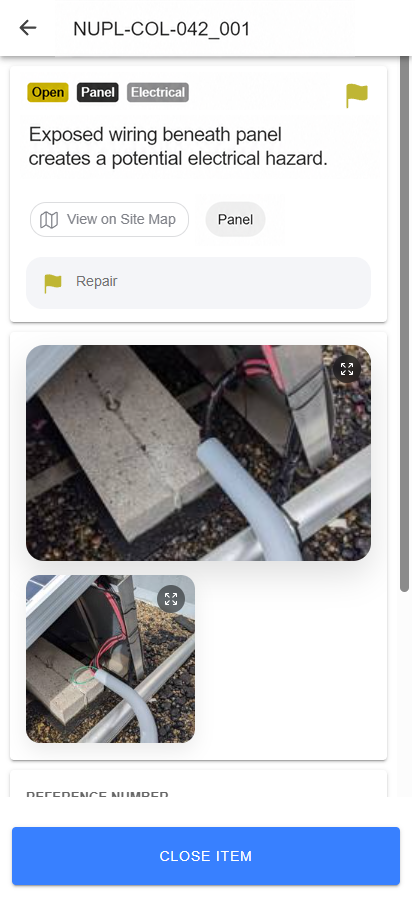
The work area, status, action, and notes remain part of the same inspection item.
Reviewers can see the evidence beside the work it supports.
Status and follow-up context remain visible for office review.
A closeout document can be complete while a deficiency still needs action. Oculi keeps open items visible as Site Follow-Up Items so the site record remains useful after delivery.
That gives the next reviewer or field crew the context behind the open work instead of only the final document.
These answers cover the reviewed record, unfinished work, field connectivity, and the first implementation step.
It keeps each inspection item tied to its photos, notes, location, status, checklist details, sign-offs, deficiencies, and follow-up so office teams can review the record and prepare the report or closeout package without reconstructing the visit.
Office teams can review missing evidence, incomplete details, inconsistent statuses, open deficiencies, and sign-offs while they are still attached to the original inspection record.
Open deficiencies and unresolved items can remain visible as Site Follow-Up Items instead of disappearing inside the completed PDF.
Oculi supports cached work, local item progress, queued photos, and sync recovery so field work can continue when connectivity is unreliable.
Start with an anonymized example from the existing O&M process: a closeout package, inspection, preventive maintenance visit, or field checklist. Operandi maps where evidence, review, reporting, and follow-up should stay connected, then configures Oculi around that workflow.
Bring an anonymized package and the field checklist behind it. We will map where missing evidence, review rework, and follow-up enter the process.